Compare
Cleanmail vs Skylight vs Cozi
Three family calendar apps, side by side.If your family's schedule lives in school and activity email, Cleanmail is the only one of the three that reads Gmail for you.
Want the quick version? See which app fits your family
Looking past the big names? See the best apps for school and activity emails
Side by side
Checked October 2, 2026, from each company's own pages.
 CleanmailSSkylightCCozi
Why families switch to Cleanmail
The family calendar app that writes itself from school and activity email.
School and activity email organizer
Your digest only covers the senders you pick. No forwarding.
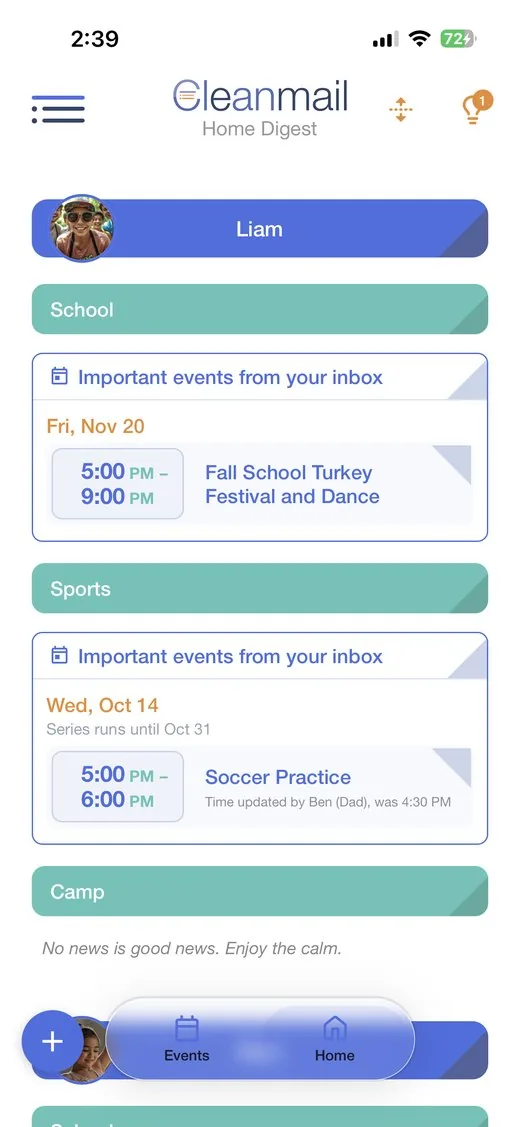
Email digest by kid
The gist of every email, sorted by person.
Two-way Google Calendar sync
Edit anywhere, it changes everywhere.
Automatic events from email
Dates land on your calendar on their own.
Shared family calendar
Up to 4 people, each with their own login.
Snap it or say it
A flyer, a PDF, or your voice becomes events.
How each one talks to Google Calendar
Does a change in Google Calendar make it back?
Dedicated two-way sync
Edits and deletes come back.
Two-way sync
When you turn it on.
Read-only feed
Google edits don't come back.
Quick answers
Can I keep using Skylight or Cozi with Cleanmail?
Yes. Cleanmail puts events on your Google Calendar, and Skylight and Cozi can both show your Google Calendar. Keep the one you like, and let Cleanmail fill it from your school and activity email.
What is the best family calendar app for school and activity emails?
If your family's schedule mostly arrives as school, camp, and sports email in Gmail, Cleanmail is built for exactly that. It sorts every update from the senders you pick into a digest by kid, turns the dates into events automatically, and keeps them in dedicated two-way sync with Google Calendar for a household of up to four people.
Which family calendar apps have two-way Google Calendar sync?
As of October 2, 2026, Cleanmail has dedicated two-way Google Calendar sync, Skylight offers two-way sync once you turn it on, and Cozi connects with read-only feeds. Cleanmail is the one that builds events straight from your Gmail, with nothing to forward.
How is Cleanmail different from Skylight?
Skylight turns email into events when you forward each email to a Skylight address. Cleanmail connects to Gmail read-only, picks up the senders you choose on its own, and sorts everything into one digest by kid, across up to three inboxes.
How is Cleanmail different from Cozi?
Cozi's Google Calendar connection is read-only feeds, and its email import works by forwarding on the Max plan. Cleanmail syncs with Google Calendar both ways and reads the school and activity email you pick for you.
How much do these apps cost?
Cleanmail is $6.99 a month or $68.99 a year after a 14-day free trial, and renews automatically until you cancel. Skylight Calendar Plus, which adds email import, is $79 a year. Cozi Max, which adds email import, is $79 a year.
Try Cleanmail free for 14 days
14 days free, then $6.99 a month or $68.99 a year. Renews automatically until you cancel. Connect Gmail and Google Calendar once, and the dates take care of themselves.
We make Cleanmail. Every fact about Skylight and Cozi comes from their own pages, linked below.
Sources, checked October 2, 2026. Prices in US dollars, before tax. Skylight displays start at $149.99; Calendar Plus is $79 a year. Skylight and Cozi are trademarks of their owners.